Django: check version support with norwegianblue

Django projects end up slotting into a bunch of software release cycles: Django itself, Python, database servers, cache servers, and more. It can be hard for us developers to keep track of all of them, with their different support policies and end-of-life dates, and running an unsupported version means missing out on important security or bug fixes.
norwegianblue is a handy command-line tool for checking software support dates. It fetches data from endoflife.date, a community-maintained database of release cycles for hundreds of products, and displays it as a colour-coded table. It’s from Hugo van Kemenade, the Python 3.14 and 3.15 release manager, and named after the deceased parrot from Monty Python’s infamous Dead Parrot sketch.
Let’s look at checking the release cycles for Django, Python, PostgreSQL, and other relevant tools with it.
Install it
norwegianblue provides two commands: norwegianblue and the shorter alias eol. I recommend the alias, since it’s easier to type and remember, and will use it throughout this post.
To make both commands available everywhere, install norwegianblue globally. If you use uv, do so with uv tool install:
$ uv tool install norwegianblue
Otherwise, install it with your preferred tool, such as a global pip install or pipx.
Check Django
Run the command without any arguments to see the list of product names it knows about:
$ eol
adonisjs
akeneo-pim
...
Somewhere in that long list are django and python, among others you probably care about. Run the command a product name to see its release cycles, for example:
$ eol django
Here’s the output of checking Django’s release cycles today, trimmed to the most recent versions:

Each row is a feature release, with LTS (long-term support) releases marked. The columns show:
release: when the feature release came out.latestandlatest release: the latest patch version and its release date.support: the end of mainstream support, after which the release only receives security fixes.eol: the end of extended support, after which the release receives no fixes at all.supportedPythonVersions: the range of Python versions that the release supports.
The dates are colour-coded: red for dates in the past, yellow for dates within the next six months, and green for dates further out. The cycle names take the colour of their eol dates, so you can quickly spot unsupported versions.
So, from the above, we can see that Django 6.1, 6.0, and 5.2 are currently supported, with 6.0 recently moving into security-fixes-only mode. Django 5.0 and 5.1 are end-of-life, so if you’re still using them, it’s time to upgrade! (My tool django-upgrade can help).
Check Python
You also need a supported Python version, which you can check with:
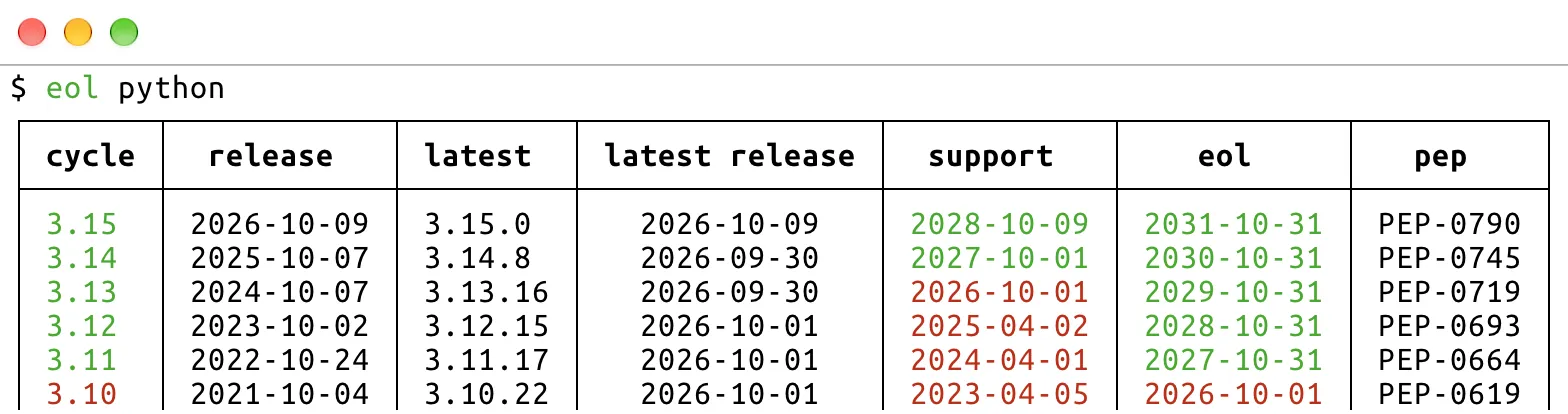
Here, support is the end of bugfix releases, and eol is the end of security releases. The pep column names the PEP containing each version’s release schedule, for example PEP-790 for Python 3.15.
Python 3.10 reached its end of life recently, so it’s time to upgrade any projects still using it!
Check PostgreSQL
The most popular database for Django projects is PostgreSQL, which you can check with the postgresql product name:
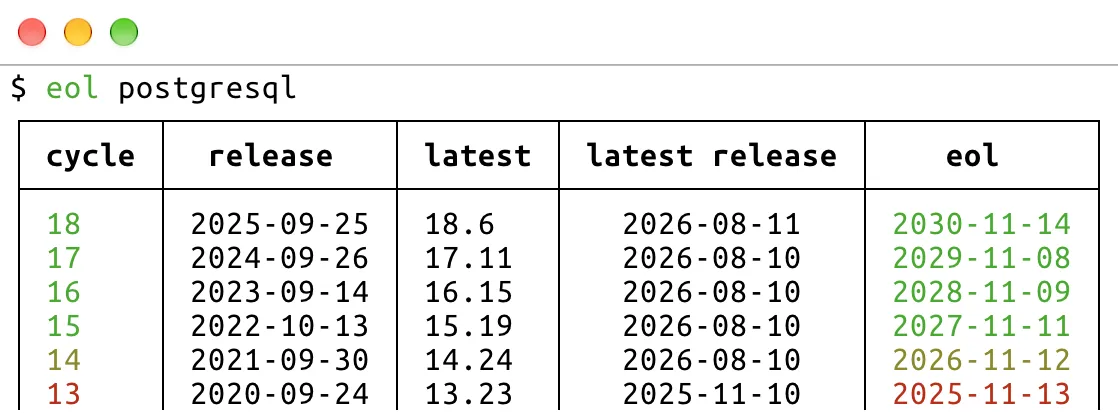
PostgreSQL supports each major version for five years, with no separate end of mainstream support. PostgreSQL 14 reaches its end of life next month, so it shows in yellow, as a warning to upgrade soon.
Django also drops support for old PostgreSQL versions, generally around their end-of-life dates. The Django database docs list the minimum version that each release supports.
Check other products
endoflife.date covers hundreds of products, so you can likely check most of your stack. Django-relevant products include:
- Other databases:
mariadb,mysql,sqlite,oracle-database, andmssqlserver. - Hosted databases:
amazon-rds-postgresql,amazon-rds-mysql,amazon-rds-mariadb,amazon-aurora-postgresql,azure-database-for-postgresql, andheroku-postgres. - Caches and other services:
redis,valkey,memcached, andelasticsearch. - Operating systems and web servers:
ubuntu,debian, andnginx. - Frontend tooling:
nodejs. - Django-based projects:
wagtail.
norwegianblue caches its data for the rest of the day, so repeated runs are fast. It can also output Markdown, reStructuredText, JSON, and other formats, as listed in --help, which may be useful for pasting into documentation or scripting checks.
Fin
Thanks to Hugo for making norwegianblue, and to the endoflife.date contributors for maintaining its data.
That web framework is not dead, nor is it just resting!
—Adam
Read my book Boost Your Git DX to Git better.
One summary email a week, no spam, I pinky promise.
Related posts:
Tags: django