Django: introducing django-launch-editor for jump-to-file debugging
I’ve made another package! django-launch-editor makes the file locations on Django’s debug error page into links that open your editor.
Here’s how it looks, on a KeyError from the package’s example project:
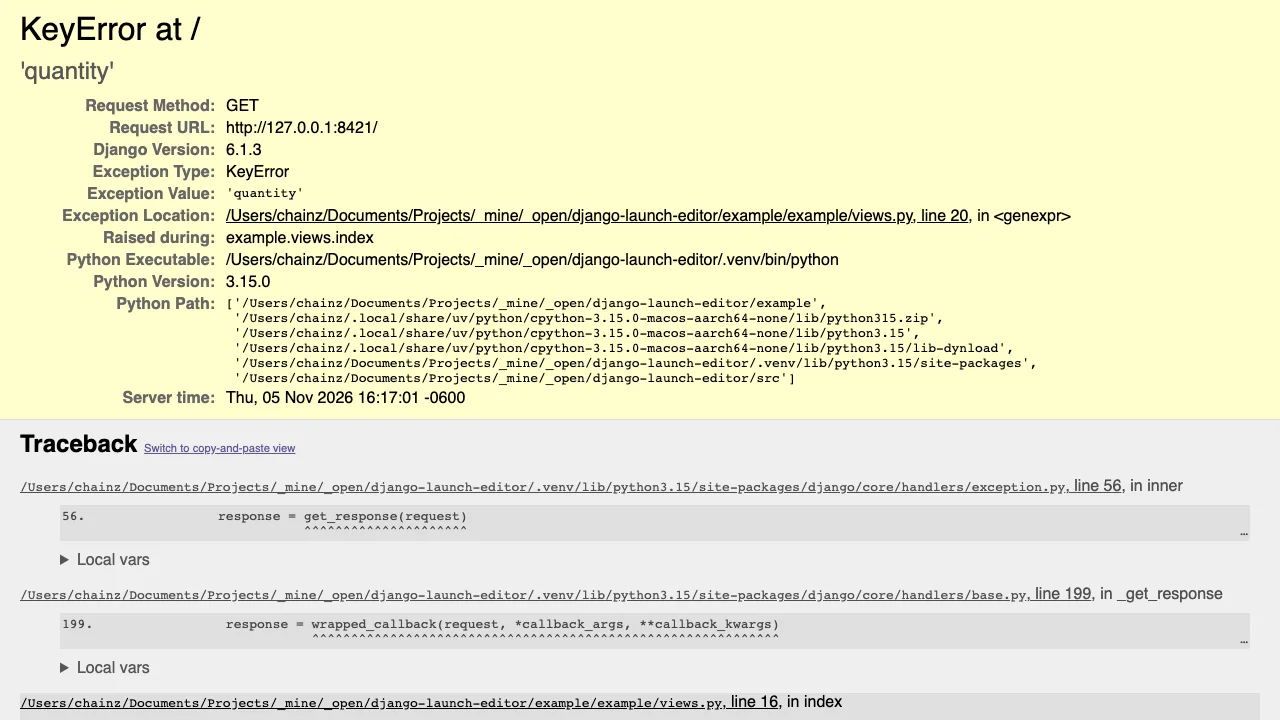
(Click to enlarge.)
The change against stock Django is subtle, but can you spot the underlines on the file locations? They’re now links that open your editor at the right line, and even the right column when Python knows it.
I think this is gonna be a neat time saver. Before, I would normally remember the filename and line number, then go open that in my editor. Or I would fiddle around copying the file path to then open it. Now it’s just a click!
Setup is as easy as installing the package, setting Django’s DEFAULT_EXCEPTION_REPORTER setting to the package’s reporter class, and adding its URLs. See the README for the details.
When DEBUG is False, the reporter adds nothing to error pages, and the URL isn’t even registered, so there’s zero overhead in production.
When no editor is found
django-launch-editor launches your editor from the Django server process, so it can only launch an editor directly when you run Django on the same machine as your editor. If you run your development Django server elsewhere, such as in a Docker container or on a remote server, it can’t find your editor. In that case, clicking a location shows this dialog and copies the location to your clipboard instead:
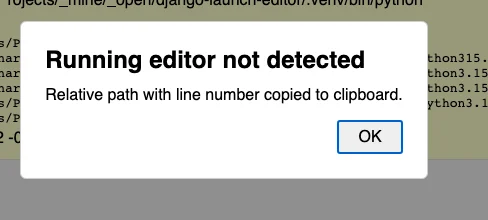
That way, you can still paste the location into your editor’s “go to file” prompt, without fiddling around selecting text.
Origins: profiling-explorer and launch-editor-py
django-launch-editor grew out of work on profiling-explorer, my browser-based interface for exploring Python profiling data. Its table shows a filename and line number for each function, with the same problem that it would be nice to open the file in my editor at that line. Initially, I added a copy button next to each location, for copying <filename>:<line> to the clipboard, but that still left the switch, paste, and wait steps. But after digging through hundreds of functions with the tool, I really wanted to be able to jump straight to the code with one click.
After a little exploration, I found that the JavaScript world had solved this problem years ago with the launch-editor npm package, which powers “click to open in editor” features in Vite and other frameworks. It detects which editor is running, by scanning the process list, and knows the command line syntax for passing a line and column to many editors. For example, VS Code wants code --goto file:line:column, PyCharm wants pycharm --line line --column column file, and Vim wants vim +line file.
Rather than reinvent this knowledge, I ported the package to Python, as launch-editor-py. Translating code between languages is a task where LLMs shine, so I used my gift Claude subscription to do the bulk of the port. That made the project small enough to be worth doing, leaving me to focus on reviewing and testing the result, adding tests, and making the API Pythonic. The README has a full list of differences from the npm package.
profiling-explorer 1.3.0, released last week, uses launch-editor-py to open file locations on click. Once I had that working, Django’s error page was the obvious next target, hence django-launch-editor.
launch-editor-py’s API
The main API for launching an editor at a given file, line, and column is a single function:
from launch_editor import LaunchEditorError, launch_editor

try:
    launch_editor("src/example.py", line=12, column=4)
except LaunchEditorError as exc:
    print(f"Could not open editor: {exc}")
launch-editor-py on the command line
launch-editor-py also comes with a command line interface, which is handy for checking which editor it detects. Use --guess to see which editor it would pick:
$ python -m launch_editor --guess
code
That’s the code command for VS Code.
Then pass a filename, optionally with a line and column, to open it:
$ python -m launch_editor example/views.py:20:15
…and VS Code jumps to line 20, column 15 of that file.
You can also try it without installing, using uv:
$ uvx --from launch-editor-py python -m launch_editor --guess
Fin
I hope django-launch-editor saves you some copying, switching, and pasting. And hopefully we can integrate launch-editor-py elsewhere in the Django ecosystem, such as in Django Debug Toolbar. Successful integration among packages could even provide good motivation to add the dependency to Django itself…
May your debugging be infrequent and fast,
—Adam
Check out my new book Boost Your GitHub DX.
One summary email a week, no spam, I pinky promise.
Related posts:
Tags: django